Chris Fredericks VK2BYI responded to a support email about an issue I was seeing with QSO Relay.
I was seeing a popup message saying that QSO Relay could not verify if a QSO had been written into the HRD Database.
I switched on "Enable Tracing" as per the troubleshooting guide.
This Created a Session log and also should the Exception logs. After turning off the enable tracing tick box it wrote all the issues to the session log.
I then sent Chris the contents of my c:\users\<my user name>\AppData\Roaming\VK3BYI\QSORelay folder to the email stated in the guide
He replied back the very next day with the solution to my problem. When I looked at his advice I indeed hadn't created a connection string to the HRD Access DB. I had not configured QSO Relay correctly - DOH. I'm not sure how I missed that but a few clicks and I was done.
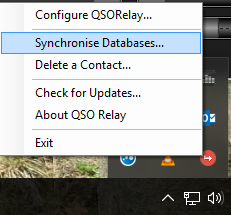
Next right clicking the QSO Relay icon in the task bar brought up the "Synchronise Databases.." option.
This synchronises the JTAlertX and HRD databases. I clicked it and got a message back saying that I had a duplicate record in my HRD database. It wrote the actual error into an exception log which is human readable. There it was in plain sight. I had a dupe in the log from back in 1980 that I hadn't noticed!
I deleted the dupe from HRD logbook and ran the synchronise process again. It ran without error.
Next, while still having the "Enable tracing" option checked I made a WSJT-X JT65 QSO.
QSO Relay intercepted the ADIF log and parsed it through to HRD without any error. I disabled the "Enable tracing" option and the session log was written to and closed. Examination of this log found that communication had worked and all was good.
I can't emphasise just how useful this small program is in your radio arsenal. When using WSJT-X and Ham Radio Deluxe Version 6.x in conjunction with the latest JTAlertX it is an essential addition.
Great thanks go to Chris VK2BYI for adding this superb program to the ham radio community and his fantastic support.
About Me
Showing posts with label JT65. Show all posts
Thursday, 25 May 2017
Wednesday, 20 July 2016
JT65 Salutations
I have been using JT modes for a number of years now and have got a typical logged QSO down to about 4 minutes. This is great for quickly changing conditions especially on 6 metres. I find the reply RRR to be superfluous and I therefore don't use it.
A typical QSO would go like this
So the logbook shows up 4 minutes elapsed time even though the initial CQ doesn't count in the logged QSO. So in theory you should be able to work 12 stations an hour (1 minute for the CQ and4 minutes for the logged QSO).
A typical QSO would go like this
- CQ G8YPH IO83 (CQ call)
- G8YPH G8RLR IO83 (QSO received by my station clock starts)
- G8RLR G8YPH -01 (QSO initial report sent clock minute 1)
- G8YPH G8RLR R-01 (QSO other station report sent minute 2)
- G8RLR G8YPH RR73 (QSO report acknowledged and 73 sent minute 3)
- G8YPH G8RLR 73 (QSO other station 73 sent minute 4)
So the logbook shows up 4 minutes elapsed time even though the initial CQ doesn't count in the logged QSO. So in theory you should be able to work 12 stations an hour (1 minute for the CQ and4 minutes for the logged QSO).
Monday, 23 May 2016
Ham Radio Deluxe announces JT modes in their DM780 module
The management at HRD demoed a version of HRD containing JT65, JT9 and WSPR modes at Dayton. Not sure of what decoder they are using nor any more details of how it has been designed.
We'll see if it lives up to the hype when it finally gets released. Until then I will carry on using JT65-HB8HQX with JTAlert,
Sunday, 1 November 2015
10m duck broken too on JT65
After reporting that I had gained contacts on 12m I managed to work stations on 10m too.
November 1st 2015 was a dazzling time on the 10 metre band - I'm not quite sure what the atmospheric conditions were for the day. For hours on end I was able to work 10m JT65A DX stations:
First contact with the continent came with Evan PU5SVE in Brazil - his QTH is 6150 miles away - finishing up with Cacho CX1DA in Uruguay again 6900 miles away.
At the time of writing 17:30 UTC November 1st 2015 the band was just closing for me. There were still a few South American stations giving -24db signals to me.
10 metres sure is a wonderful band and it's surprising what you can do with just 5 watts of RF feeding a piece of wire strung between a couple of trees!
Good DX everybody.
November 1st 2015 was a dazzling time on the 10 metre band - I'm not quite sure what the atmospheric conditions were for the day. For hours on end I was able to work 10m JT65A DX stations:
- UN7SB Igor from Baikonur in Kazakhstan (where the space launch centre is based) was the first - a not inconsiderable distance of 2900 miles east of this QTH
- many relatively close European stations
- finally ending up in the Americas.
First contact with the continent came with Evan PU5SVE in Brazil - his QTH is 6150 miles away - finishing up with Cacho CX1DA in Uruguay again 6900 miles away.
At the time of writing 17:30 UTC November 1st 2015 the band was just closing for me. There were still a few South American stations giving -24db signals to me.
10 metres sure is a wonderful band and it's surprising what you can do with just 5 watts of RF feeding a piece of wire strung between a couple of trees!
Good DX everybody.
Thursday, 22 October 2015
12m duck broken
After reporting that I hadn't ever worked a contact on the 12 metre band well I'm pleased to report that I have made multiple contacts today on 24.917 MHz using JT65A.
The first one was Alexander UT1AN in Ukraine who gave me a -7db signal report me giving him a -5db report. This was closely followed by Nick SV1BHF in Athens who gave me a -1db to his -5db.
The band suddenly became active in the UK at around 13:28 UTC and I continued to work multiple contacts throughout the afternoon.
Then the band suddenly, without warning, went dead - what an odd band!
The first one was Alexander UT1AN in Ukraine who gave me a -7db signal report me giving him a -5db report. This was closely followed by Nick SV1BHF in Athens who gave me a -1db to his -5db.
The band suddenly became active in the UK at around 13:28 UTC and I continued to work multiple contacts throughout the afternoon.
Then the band suddenly, without warning, went dead - what an odd band!
Thursday, 8 October 2015
New version of JT65-HF-HB9HQX and JTAlert released.
JT65-HF-HB9HQX
I have just installed Version 1.0 of JT65-HF-HB9HQX and it looks slightly different. You can't install this directly over the top of older pre 1.0 versions as it uses a different directory structure. No matter as HB9NQX has a readme with the software that tells you what to do. Essential copy the contents of the old JT65-HF-Appfiles folder into the new one which is just called Appfiles now.I also copied the contents of JT65-HF-Logfiles into the new logfiles folder.
When you start the software you have to enter some information Callsign, Location data etc, and set the output level to your sound card. Oh you also need to reconfigure for the soundcards you have in use. None of that data comes across from the old versions.
You can now automatically upload to eQSL.cc - I don't believe that was possible before.
There is:
- Full integration with Ham Radio Deluxe
- CAT integration with Omnirig, HamLib, CI-V Commander.
- Logging to HRD, DXKeeper, Log OM and MixW2
Wednesday, 12 August 2015
JT65-HF HB9EQX Edition
As part of my exploration into the, new to me, JT65 mode I have found lots of pieces of software written to make the use of the mode. One of which is JT65-HF HB9HQX Edition which is currently at version 0.9.98.0
Obviously a lot of work has gone into this and joy of joys it interfaces really well with Ham Radio Deluxe. When first launched it asks you for your station details, the rig connection, the sound cards and whether you are using CAT. It also asks you what form of logging you have. A lot of the extensive settings can be left at the default,
If you are using Ham Radio Deluxe with CAT simply choose the "Cat is enabled via Ham Radio Deluxe.." option and, assuming you already have HRD working fine, it will work seamlessly. You do have to stop DM780 before you start JT65-HF however.
The screen shows the waterfall in the narrow portion and the dialog exchange in the main scrollable window. If you have CAT working successfully the frequency and band are in the QRG and Band boxes top left. Above the current date and time are the audio input level and a user defined output level.
The main buttons controlling the dialog exchange are on the right hand side and are arranged in a logical order. They conveniently change colour throughout a QSO which is useful if you are wondering what to press next!
When you have finished the QSO button you simply press the Log QSO button and a dialog box allowing you to customize any message appears. Clicking the next Log QSO button actually writes the entry to the logbook - in my case the HRD logbook.
What I have found though is if you have HRD to automatically send an eQSL to eQSL.cc it doesn't work when using this method of log addition. You have to manually select the QSO's in HRD Logbook and upload them to eQSL manually. Not a great problem but if you were waiting for that elusive QSL card and wondering why this is the reason. Also if you normally use QRZ.COM to enter the various station fields from within HRD Logbook you will find that the stations added from JT65HF will need refreshing to get their full details. Again not a problem you just need to be aware of it.
CQs and DX calls appear in green, existing exchanges between stations are shown in blue. Your signals are shown with a white background. This is all assuming you use the default colours.
The waterfall shows a graphical representation of what is being recieved. You can also set it so it shows the callsigns of the stations. You current transmit frequency is highlighted by a red bar above the waterfall.
To reply to a CQ request you simply left click (on a Windows PC) on the green highlighted entry. This automatically populates the "Generated Text" field with a suitable reply. This by convention is their callsign, your callsign and your locator square. Then at the start of the next minute the application transmits this message.
The station will then reply back with a signal report - the displayed colour is pink. In the meantime JT-65HF highlights the next appropriate button to press. In this case it is the R-db button. It then populates the Generated Text field with his station, your station and a R with a reading of the dB sent field.
The other station then replies back with either RRR or 73. You click on the 73 button and again the relevant text is populated in the reply box and the QSO is finished.
Finally you click on the Log QSO button and it will make an entry in your log.
If you have enabled sound it will also sound a CQ in morse on your shack monitor when somebody has sent a CQ. You can also set the sound to warn you if somebody has replied back to you. I have mine set to G8YPH in morse. There are other sounds you can set too.
If you have already worked a station on JT65 before then their entry in the exchange screen is marked in a dark green colour and it says QSO B4 at the tail end of the entry which is convenient.
There are many more features of this well written program and I have found so far that it is by far the easiest to use. The only limitation is that is only 1 mode available and that is JT65 so if you want to use it on 6m with JT6M you can't.
Obviously a lot of work has gone into this and joy of joys it interfaces really well with Ham Radio Deluxe. When first launched it asks you for your station details, the rig connection, the sound cards and whether you are using CAT. It also asks you what form of logging you have. A lot of the extensive settings can be left at the default,
| The main screen |
| Choose HRD on the CAT tab |
The screen shows the waterfall in the narrow portion and the dialog exchange in the main scrollable window. If you have CAT working successfully the frequency and band are in the QRG and Band boxes top left. Above the current date and time are the audio input level and a user defined output level.
| Conversation buttons |
The main buttons controlling the dialog exchange are on the right hand side and are arranged in a logical order. They conveniently change colour throughout a QSO which is useful if you are wondering what to press next!
When you have finished the QSO button you simply press the Log QSO button and a dialog box allowing you to customize any message appears. Clicking the next Log QSO button actually writes the entry to the logbook - in my case the HRD logbook.
| Log QSO |
Simple QSO operation.
If everything has been setup correctly, the application communicating with the rig, the soundcard levels set, the rig tuned to one of the JT65 frequencies (you can select them from the QRG pulldown) and the antenna tuned you can just sit and watch contacts appearing on the Exchange screen.CQs and DX calls appear in green, existing exchanges between stations are shown in blue. Your signals are shown with a white background. This is all assuming you use the default colours.
| The exchange box |
The waterfall shows a graphical representation of what is being recieved. You can also set it so it shows the callsigns of the stations. You current transmit frequency is highlighted by a red bar above the waterfall.
| A typical waterfall display |
To reply to a CQ request you simply left click (on a Windows PC) on the green highlighted entry. This automatically populates the "Generated Text" field with a suitable reply. This by convention is their callsign, your callsign and your locator square. Then at the start of the next minute the application transmits this message.
| The reply to you showing the initial signal report -02 dB |
| Replies to you are in pink and you can see the 73 message |
| The next button to press is automatically highlighted |
Finally you click on the Log QSO button and it will make an entry in your log.
If you have enabled sound it will also sound a CQ in morse on your shack monitor when somebody has sent a CQ. You can also set the sound to warn you if somebody has replied back to you. I have mine set to G8YPH in morse. There are other sounds you can set too.
If you have already worked a station on JT65 before then their entry in the exchange screen is marked in a dark green colour and it says QSO B4 at the tail end of the entry which is convenient.
| QSO B4 |
There are many more features of this well written program and I have found so far that it is by far the easiest to use. The only limitation is that is only 1 mode available and that is JT65 so if you want to use it on 6m with JT6M you can't.
Monday, 10 August 2015
WSJT-X JT65 Operation using the Yaesu FT-450D
I decided to have a look at the JT digimodes to see if I decipher these strange tones I'd heard. For those people unfamiliar with JT these modes have been designed to allow amateurs to have QSO's using 13 character overs using very low power and hence very weak signals. A typical over would be:
After installation of the software you go to the setup screen and enter your Callsign and locator square. Then you set the sound cards that you are using, choose the rig from an extensive database on a pulldown and then set the COM port settings and whether to let the rig CAT control the PTT.
All very simple to do and so much easier than the other popular program WSJT.
However WSJT-X does have a limitation in that it currently (August 2015) encodes/decodes JT65 and JT9 protocols. Whereas WSJX contains all sorts of exotic modes - but I never managed to get the latter to key the transmitter so it is irrelevant to me!
I switched the rig on, loaded the WSJT-X program, set it to JT65 mode, got it to tune the rig to 14.076 MHz (the CAT control works well as long as you first set the Yaesu FT450D to VFO mode and USB/DATA) and just listened for a while to see what it would pickup.
It seems that JT modes can be set to transmit on even or odd minutes and transmit 13 characters at a time.
After a segment of listening a typical QSO looks similar to this:
As this one station is set to transmit on odd minutes and the other is on even minutes the minimum amount of time for the QSO is 6 minutes. Of course you might both be on even minutes (I've seen some stations doing that for some odd reason) so it could take 11 minutes to do the QSO! You just have to be patient whilst operating this mode.
Unfortunately this particular piece of software will not work with Ham Radio Deluxe yet so I have to unload the HRD rig control and DM780 software module. You can still have the HRD Logbook module running but have to enter any QSO's manually. I suppose it's only a matter of time until the JT modes are integrated.
Watch this space....
73s de Terry G8YPH
- Call CQ with the Maidenhead locator
- Establish contact
- Exchange signal reports
- Wish each other best wishes and terminate the QSO
| WSJT-X wide waterfall |
After installation of the software you go to the setup screen and enter your Callsign and locator square. Then you set the sound cards that you are using, choose the rig from an extensive database on a pulldown and then set the COM port settings and whether to let the rig CAT control the PTT.
All very simple to do and so much easier than the other popular program WSJT.
| WSJT-X setup screen with specifics for my FT-450D and the COM port configuration |
However WSJT-X does have a limitation in that it currently (August 2015) encodes/decodes JT65 and JT9 protocols. Whereas WSJX contains all sorts of exotic modes - but I never managed to get the latter to key the transmitter so it is irrelevant to me!
I switched the rig on, loaded the WSJT-X program, set it to JT65 mode, got it to tune the rig to 14.076 MHz (the CAT control works well as long as you first set the Yaesu FT450D to VFO mode and USB/DATA) and just listened for a while to see what it would pickup.
| The receive (green) and transmit (red) audio frequencies can also be seen in the waterfall |
It seems that JT modes can be set to transmit on even or odd minutes and transmit 13 characters at a time.
| Checkbox to set transmitting in even minutes |
Musical notes
JT65 and similar modes sound like a piccolo flute to the human ear. WSJT-X has a waterfall display that shows the various signals in a graphical form that it is picking up. At the end of a transmission the decoder kicks in an a series of QSO's appear on the left hand side of the main display.After a segment of listening a typical QSO looks similar to this:
- CQ G8YPH IO83 - A CQ call is made by G8YPH with the locator square
- G8YPH K1ABC FN42 - K1ABC responds back with their locator square
- K1ABC G8YPH -21 - G8YPH sends a signal report
- G8YPH K1ABC R-19 - K1ABC acknowledges and sends a signal report
- K1ABC G8YPH RRR - G8YPH sends an acknowledgement
- G8YPH K1ABC 73 - K1ABC sends best wishes and the QSO is complete
As this one station is set to transmit on odd minutes and the other is on even minutes the minimum amount of time for the QSO is 6 minutes. Of course you might both be on even minutes (I've seen some stations doing that for some odd reason) so it could take 11 minutes to do the QSO! You just have to be patient whilst operating this mode.
Power settings
The power settings of the rig are normally quite low - initial contact could be 20 watts dropping to 5 watts. Worldwide communication is possible using these modes with quite modest power settings and antenna setups. I'm going to investigate the modes more as my first contact was on 20m with a station in Moldova. This was a country I hadn't worked on any mode despite it being in Europe. I left the rig on just listening and Chinese stations were clearly seen and worked - another country I had never been able to work on fatter bandwidth modes. China is some 8000 miles away from this station QTH and both this station and the Chinese station were running just 5 watts.Unfortunately this particular piece of software will not work with Ham Radio Deluxe yet so I have to unload the HRD rig control and DM780 software module. You can still have the HRD Logbook module running but have to enter any QSO's manually. I suppose it's only a matter of time until the JT modes are integrated.
Future operational details
I'll report on the various aspects of this software in future posts as I find out how best to operate it.Watch this space....
73s de Terry G8YPH
Subscribe to:
Posts (Atom)