Showing posts with label JTAlert. Show all posts

Thursday, 25 May 2017

QSO Relay 1.3 - An update

Chris Fredericks VK2BYI responded to a support email about an issue I was seeing with QSO Relay.
I was seeing a popup message saying that QSO Relay could not verify if a QSO had been written into the HRD Database.
I switched on "Enable Tracing" as per the troubleshooting guide.
This Created a Session log and also should the Exception logs. After turning off the enable tracing tick box it wrote all the issues to the session log.

I then sent Chris the contents of my c:\users\<my user name>\AppData\Roaming\VK3BYI\QSORelay folder to the email stated in the guide

He replied back the very next day with the solution to my problem.  When I looked at his advice I indeed hadn't created a connection string to the HRD Access DB. I had not configured QSO Relay correctly - DOH. I'm not sure how I missed that but a few clicks and I was done.

Next right clicking the QSO Relay icon in the task bar brought up the "Synchronise Databases.." option.
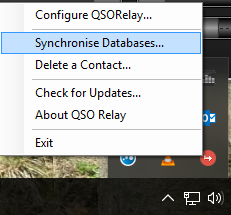
This synchronises the JTAlertX and HRD databases. I clicked it and got a message back saying that I had a duplicate record in my HRD database. It wrote the actual error into an exception log which is human readable. There it was in plain sight. I had a dupe in the log from back in 1980 that I hadn't noticed!
I deleted the dupe from HRD logbook and ran the synchronise process again. It ran without error.

Next, while still having the "Enable tracing" option checked I made a WSJT-X JT65 QSO.
QSO Relay intercepted the ADIF log and parsed it through to HRD without any error. I disabled the "Enable tracing" option and the session log was written to and closed. Examination of this log found that communication had worked and all was good.

I can't emphasise just how useful this small program is in your radio arsenal. When using WSJT-X and Ham Radio Deluxe Version 6.x in conjunction with the latest JTAlertX it is an essential addition.

Great thanks go to Chris VK2BYI for adding this superb program to the ham radio community and his fantastic support.

Tuesday, 3 January 2017

News from Ham Radio Deluxe and JTAlert

It seems that controversial co owner of Ham Radio Deluxe LLC Rick Ruhl W4PC has now retired from HRD LLC his last day was 30/12/2016. I wish the company all the best in their future endeavours.
A few days earlier the author of the fantastic JTAlert program Laurie VK3AMA has stated that version 2.9 will no longer support Ham Radio Deluxe integration. This is a shame but entirely understandable given the way he was treated.
To all JTAlert / HRD V6 users. 

I will no longer be providing support for HRD V6 logging within JTAlert.
This comes into effect with the next public release of JTAlert (2.9.0).

Affected HRD users can continue to use the current version of JTAlert (2.8.7) for as long as they want.
I will not be able to provide any support for that version, however, if a future HRD release breaks the JTAlert/HRD integration.

The free V5 of HRD will continue to be supported.

Moving forward, all future JTAlert versions will not support HRD V6 logging.

I will not be participating in any public or private discussions regarding the reasons for this decision".

I sincerely apologise to the affected HRD users.

de Laurie VK3AMA


And later he gave a brief expanation of his decision

Laurie, VK3AMA

After some "soul-searching", I now feel I owe the community an explanation, even if brief, regarding my decision to abandon HRD V6 logging support in JTAlert, especially to those users directly affected by this decision.

"Bottom-Line", I don't want myself or my software to have any sort of association with HRDLLC the company, their policies or their products.

This decision was a long time coming. The draft for the announcement had been sitting in my email draft folder for over 12 months. I came close to making the announcement on two other occasions in that time, but chose to "back-off", primarily because I knew this would affect a large number of JTAlert users and I felt uncomfortable with that.

The "die was cast" when HRDLLC released HRD ver 6.3.0.435 in October 2015. That release contained malicious code that deliberately shutdown JTAlert on a users PC without warning or message to the user that HRD had performed this unauthorised act. Details of this are publicly available within this groups message archives.

There have been several other events and interactions with HRDLLC over that time that are not publicly known, contributing to this decision, and I will not be discussing them here or privately.

While the association with HRDLLC was simply that my software had a feature that extended the functionality of HRD in providing a JT65/JT9 logging bridge, I am no longer comfortable supporting (by association) HRDLLC the Company, their policies or their products.

Again, I sincerely apologise to the affected HRD users.


de Laurie VK3AMA

I currently am running the following to control the rig for JT modes:

  • Version 6.3.0.612 of Ham Radio Deluxe
  • Version 2.8.7 of JTAlertX
  • Version 1.7.0 r7405 of WSJT-X


It looks like this may be my setup for the foreseeable future until something else comes about - I might have a look at DXLab again for instance. I do wish with the change in management of HRDLLC that they can make amends with Laurie but I do entirely understand and support Laurie's decision.

Tuesday, 17 November 2015

JT65-HF HB9HQX, JTAlert and Ham Radio Deluxe Database configuration tips

If you read this blog you know that I use all of the above. I found a problem where JTAlert would not intercept QSO logging from HB9HQX and write it to HRD and online xml databases.

It appears I had configured HB9HQX incorrectly for it to work properly with JTAlert. Laurie, VK3AMA, the writer of JTAlert is a busy man and hasn't got around to fully completing the help files for JTAlert so there is a lack of information here.
I wrote to Laurie and he told me what the correct configuration should be.

JT65-HF HB9HQX should be set to log to its default local log. I had it set for HRD logbook which would negate JTAlert from functioning correctly.
JT65-HF HB9HQX log configuration tab

Tuesday, 10 November 2015

JTAlert and Ham Radio Deluxe

First of all I use JTAlert and JT65-HF-HB9HQX (both of which have kindly been given for free for the use of radio amateurs) as my method of transmitting JT65 modes.
I also use a paid for Ham Radio Deluxe Rig Control to operate my radio. I also use Ham Radio Deluxe Logbook to store contacts - I am a customer of HRDSoftwareLLC and this is well worth paying for. All was working well until the good people at HRD decided to incorporate a kill mechanism into their logbook software (version 6.3.0.435) which would kill the JTAlert.exe process.
The reason behind this was to protect their customers databases from being corrupted.

Essentially JTAlert when used with other JT65 software was being used to write the contact details directly to the HRD logbook database. HRD had found it was corrupting certain aspects of the database and numerous call tickets had been raised around the matter. So they took the drastic steps of preventing JTAlert from running when HRD logbook was running. I can understand the reasons behind this as they are a relatively small company and potentially could have been swamped with support calls to try to fix something that was not of their making.

Then there were various software updates to JTAlert after HRD had given the API details out publicly. This now means the current version of JTAlert (2.6.21 or greater) writes to the database via the API and is no longer corrupting the database.
Ham Radio Deluxe was updated (Version 6.3.0.439) to remove the kill mechanism and all is good again.

Reading between the lines it appears that the writer of the JTALert software and the developers of HRD initially were not in communication but now through an intermediary seem to have resolved their differences.

As it happened my particular setup never made use of JTALert to write to the database at all! JT65-HF-HB9HQX uses the API to write to the database without the use of JTALert. In fact the only reason I use JTAlert is to tell me what countries have been decoded and whether I need them for DXCC.

I have a paid for subscription to Ham Radio Deluxe and when the version came out with the kill mechanism it stopped my JTAlert from working so making me unhappy.

At the time of writing November 10 2015 I have the following software versions:

  • JT65-HF HB9HQX Version 1.0 update 6
  • JTAlert 2.6.22
  • Ham Radio Deluxe Suite  Version 6.3.0.447
I'm so glad the toys are now back in the pram and the children are playing happily once again.


Thursday, 8 October 2015

New version of JT65-HF-HB9HQX and JTAlert released.

JT65-HF-HB9HQX

I have just installed Version 1.0 of JT65-HF-HB9HQX and it looks slightly different. You can't install this directly over the top of older pre 1.0 versions as it uses a different directory structure. No matter as HB9NQX has a readme with the software that tells you what to do. Essential copy the contents of the old JT65-HF-Appfiles folder into the new one which is just called Appfiles now.
I also copied the contents of JT65-HF-Logfiles into the new logfiles folder.

When you start the software you have to enter some information Callsign, Location data etc, and set the output level to your sound card. Oh you also need to reconfigure for the soundcards you have in use. None of that data comes across from the old versions.

You can now automatically upload to eQSL.cc - I don't believe that was possible before.
There is:

  • Full integration with Ham Radio Deluxe 
  • CAT integration with Omnirig, HamLib, CI-V Commander. 
  • Logging to HRD, DXKeeper, Log OM and MixW2