I thought this was a temporary fault with HRD 6.4.0.646 as reported in a previous post. The latest version 659 still has the same problem.
This is when upgrading from an older version to the current version then the installation routine uninstalls the Microsoft Access Runtime.
Not a major issue as long as you manually reinstall the runtime before you fire up the logbook module.
Showing posts with label Ham Radio Deluxe. Show all posts
Showing posts with label Ham Radio Deluxe. Show all posts
Friday, 7 July 2017

Thursday, 25 May 2017
QSO Relay 1.3 - An update
Chris Fredericks VK2BYI responded to a support email about an issue I was seeing with QSO Relay.
I was seeing a popup message saying that QSO Relay could not verify if a QSO had been written into the HRD Database.
I switched on "Enable Tracing" as per the troubleshooting guide.
 This Created a Session log and also should the Exception logs. After turning off the enable tracing tick box it wrote all the issues to the session log.
I then sent Chris the contents of my c:\users\<my user name>\AppData\Roaming\VK3BYI\QSORelay folder to the email stated in the guide
He replied back the very next day with the solution to my problem. When I looked at his advice I indeed hadn't created a connection string to the HRD Access DB. I had not configured QSO Relay correctly - DOH. I'm not sure how I missed that but a few clicks and I was done.
Next right clicking the QSO Relay icon in the task bar brought up the "Synchronise Databases.." option.
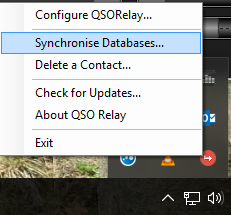
This synchronises the JTAlertX and HRD databases. I clicked it and got a message back saying that I had a duplicate record in my HRD database. It wrote the actual error into an exception log which is human readable. There it was in plain sight. I had a dupe in the log from back in 1980 that I hadn't noticed!
I deleted the dupe from HRD logbook and ran the synchronise process again. It ran without error.
Next, while still having the "Enable tracing" option checked I made a WSJT-X JT65 QSO.
QSO Relay intercepted the ADIF log and parsed it through to HRD without any error. I disabled the "Enable tracing" option and the session log was written to and closed. Examination of this log found that communication had worked and all was good.
I can't emphasise just how useful this small program is in your radio arsenal. When using WSJT-X and Ham Radio Deluxe Version 6.x in conjunction with the latest JTAlertX it is an essential addition.
Great thanks go to Chris VK2BYI for adding this superb program to the ham radio community and his fantastic support.
I was seeing a popup message saying that QSO Relay could not verify if a QSO had been written into the HRD Database.
I switched on "Enable Tracing" as per the troubleshooting guide.

I then sent Chris the contents of my c:\users\<my user name>\AppData\Roaming\VK3BYI\QSORelay folder to the email stated in the guide
He replied back the very next day with the solution to my problem. When I looked at his advice I indeed hadn't created a connection string to the HRD Access DB. I had not configured QSO Relay correctly - DOH. I'm not sure how I missed that but a few clicks and I was done.
Next right clicking the QSO Relay icon in the task bar brought up the "Synchronise Databases.." option.
This synchronises the JTAlertX and HRD databases. I clicked it and got a message back saying that I had a duplicate record in my HRD database. It wrote the actual error into an exception log which is human readable. There it was in plain sight. I had a dupe in the log from back in 1980 that I hadn't noticed!
I deleted the dupe from HRD logbook and ran the synchronise process again. It ran without error.
Next, while still having the "Enable tracing" option checked I made a WSJT-X JT65 QSO.
QSO Relay intercepted the ADIF log and parsed it through to HRD without any error. I disabled the "Enable tracing" option and the session log was written to and closed. Examination of this log found that communication had worked and all was good.
I can't emphasise just how useful this small program is in your radio arsenal. When using WSJT-X and Ham Radio Deluxe Version 6.x in conjunction with the latest JTAlertX it is an essential addition.
Great thanks go to Chris VK2BYI for adding this superb program to the ham radio community and his fantastic support.
Tuesday, 3 January 2017
News from Ham Radio Deluxe and JTAlert
It seems that controversial co owner of Ham Radio Deluxe LLC Rick Ruhl W4PC has now retired from HRD LLC his last day was 30/12/2016. I wish the company all the best in their future endeavours.
A few days earlier the author of the fantastic JTAlert program Laurie VK3AMA has stated that version 2.9 will no longer support Ham Radio Deluxe integration. This is a shame but entirely understandable given the way he was treated.
To all JTAlert / HRD V6 users.
I will no longer be providing support for HRD V6 logging within JTAlert.
This comes into effect with the next public release of JTAlert (2.9.0).
Affected HRD users can continue to use the current version of JTAlert (2.8.7) for as long as they want.
I will not be able to provide any support for that version, however, if a future HRD release breaks the JTAlert/HRD integration.
The free V5 of HRD will continue to be supported.
Moving forward, all future JTAlert versions will not support HRD V6 logging.
I will not be participating in any public or private discussions regarding the reasons for this decision".
I sincerely apologise to the affected HRD users.
de Laurie VK3AMA
And later he gave a brief expanation of his decision
Laurie, VK3AMA
After some "soul-searching", I now feel I owe the community an explanation, even if brief, regarding my decision to abandon HRD V6 logging support in JTAlert, especially to those users directly affected by this decision.
"Bottom-Line", I don't want myself or my software to have any sort of association with HRDLLC the company, their policies or their products.
This decision was a long time coming. The draft for the announcement had been sitting in my email draft folder for over 12 months. I came close to making the announcement on two other occasions in that time, but chose to "back-off", primarily because I knew this would affect a large number of JTAlert users and I felt uncomfortable with that.
The "die was cast" when HRDLLC released HRD ver 6.3.0.435 in October 2015. That release contained malicious code that deliberately shutdown JTAlert on a users PC without warning or message to the user that HRD had performed this unauthorised act. Details of this are publicly available within this groups message archives.
There have been several other events and interactions with HRDLLC over that time that are not publicly known, contributing to this decision, and I will not be discussing them here or privately.
While the association with HRDLLC was simply that my software had a feature that extended the functionality of HRD in providing a JT65/JT9 logging bridge, I am no longer comfortable supporting (by association) HRDLLC the Company, their policies or their products.
Again, I sincerely apologise to the affected HRD users.
de Laurie VK3AMA
I currently am running the following to control the rig for JT modes:
It looks like this may be my setup for the foreseeable future until something else comes about - I might have a look at DXLab again for instance. I do wish with the change in management of HRDLLC that they can make amends with Laurie but I do entirely understand and support Laurie's decision.
A few days earlier the author of the fantastic JTAlert program Laurie VK3AMA has stated that version 2.9 will no longer support Ham Radio Deluxe integration. This is a shame but entirely understandable given the way he was treated.
To all JTAlert / HRD V6 users.
I will no longer be providing support for HRD V6 logging within JTAlert.
This comes into effect with the next public release of JTAlert (2.9.0).
Affected HRD users can continue to use the current version of JTAlert (2.8.7) for as long as they want.
I will not be able to provide any support for that version, however, if a future HRD release breaks the JTAlert/HRD integration.
The free V5 of HRD will continue to be supported.
Moving forward, all future JTAlert versions will not support HRD V6 logging.
I will not be participating in any public or private discussions regarding the reasons for this decision".
I sincerely apologise to the affected HRD users.
de Laurie VK3AMA
And later he gave a brief expanation of his decision
Laurie, VK3AMA
After some "soul-searching", I now feel I owe the community an explanation, even if brief, regarding my decision to abandon HRD V6 logging support in JTAlert, especially to those users directly affected by this decision.
"Bottom-Line", I don't want myself or my software to have any sort of association with HRDLLC the company, their policies or their products.
This decision was a long time coming. The draft for the announcement had been sitting in my email draft folder for over 12 months. I came close to making the announcement on two other occasions in that time, but chose to "back-off", primarily because I knew this would affect a large number of JTAlert users and I felt uncomfortable with that.
The "die was cast" when HRDLLC released HRD ver 6.3.0.435 in October 2015. That release contained malicious code that deliberately shutdown JTAlert on a users PC without warning or message to the user that HRD had performed this unauthorised act. Details of this are publicly available within this groups message archives.
There have been several other events and interactions with HRDLLC over that time that are not publicly known, contributing to this decision, and I will not be discussing them here or privately.
While the association with HRDLLC was simply that my software had a feature that extended the functionality of HRD in providing a JT65/JT9 logging bridge, I am no longer comfortable supporting (by association) HRDLLC the Company, their policies or their products.
Again, I sincerely apologise to the affected HRD users.
de Laurie VK3AMA
I currently am running the following to control the rig for JT modes:
- Version 6.3.0.612 of Ham Radio Deluxe
- Version 2.8.7 of JTAlertX
- Version 1.7.0 r7405 of WSJT-X
It looks like this may be my setup for the foreseeable future until something else comes about - I might have a look at DXLab again for instance. I do wish with the change in management of HRDLLC that they can make amends with Laurie but I do entirely understand and support Laurie's decision.
Monday, 23 May 2016
Ham Radio Deluxe announces JT modes in their DM780 module
The management at HRD demoed a version of HRD containing JT65, JT9 and WSPR modes at Dayton. Not sure of what decoder they are using nor any more details of how it has been designed.
We'll see if it lives up to the hype when it finally gets released. Until then I will carry on using JT65-HB8HQX with JTAlert,

We'll see if it lives up to the hype when it finally gets released. Until then I will carry on using JT65-HB8HQX with JTAlert,

Sunday, 17 April 2016
FT450D and Ham Radio Deluxe - Macro for switching to low power, initiating TX, tune external ATU, resetting back to original power.
As some operators of the FT450D know there is a CS button that can be programmed to do a number of useful features. Unfortunately Yaesu in their wisdom omitted this button from being controlled with a CAT command. So using a program such as Ham Radio Deluxe you can't press this button with a mouse click.
I have programmed my particular CS button to initiate a low power carrier to enable the antenna to be tuned. Note this is not the same as the TUNE button which initiates the tuning of the internal ATU.
I had been looking for ages to try and find a way of doing this then I thought of macros that are available from within Ham Radio Deluxe (other programs may also have this feature and the following commands also apply).
Most of my working is on digital modes such as JT65 or PSK31. This is normally transmitted on USB regardless of the band so I set out doing this:
The CAT commands to do this are below
MD03;
EX048005;
TX1;
TX;
TX1;
TX;
TX0;
MD0C;
EX048030;
I put multiple TX1 TX commands in as HRD seemed to just switch TX power on and off almost simultaneously. So the addition of a couple more TX commands resulted in what I was looking for and latched TX on until I pressed the macro button again..
Save this as a macro in Ham Radio Deluxe and assign it to a button. (read the HRD manual to do this).
One click does the first part of the macro resulting in the TX button being set. Another press of the button switches off the TX and resets everything (apart from the power) back to the original settings. Because there appeared to be a bug somewhere in having the the EX048005; and EX048030; commands in the same macro I wrote another separate macro to set the power to 30 watts.
If you use HRD try it out. If you have another CAT control program the same command should also work.
In the Macro editor create a new macro
Add the following commands in
TYPE TITLE VALUE
Advanced/Slide RF Power 5
Dropdown Button Mode: AM
Standard Button TX Switch ON
Standard Button TX Switch OFF
Dropdown Button Mode: USER-U
I have programmed my particular CS button to initiate a low power carrier to enable the antenna to be tuned. Note this is not the same as the TUNE button which initiates the tuning of the internal ATU.
I had been looking for ages to try and find a way of doing this then I thought of macros that are available from within Ham Radio Deluxe (other programs may also have this feature and the following commands also apply).
Most of my working is on digital modes such as JT65 or PSK31. This is normally transmitted on USB regardless of the band so I set out doing this:
- Change the mode to AM (or CW - my LDG RT-100 works ok on any mode but they recommend AM)
- Set the power at 5 watts
- Trigger the transmitter. This enables you to press any external ATU tune buttons or if like me you have a carrier triggered fully automatic remote ATU - nothing.
- Set the mode back to USER U (USB audio fed to the rig via the data socket)
- Set the power back to its original setting - in my case 30 watts
The CAT commands to do this are below
MD03;
EX048005;
TX1;
TX;
TX1;
TX;
TX0;
MD0C;
EX048030;
I put multiple TX1 TX commands in as HRD seemed to just switch TX power on and off almost simultaneously. So the addition of a couple more TX commands resulted in what I was looking for and latched TX on until I pressed the macro button again..
Save this as a macro in Ham Radio Deluxe and assign it to a button. (read the HRD manual to do this).
 |
| 30 Watts and AM TUNE Buttons added |
In use here is what I do
One click does the first part of the macro resulting in the TX button being set. Another press of the button switches off the TX and resets everything (apart from the power) back to the original settings. Because there appeared to be a bug somewhere in having the the EX048005; and EX048030; commands in the same macro I wrote another separate macro to set the power to 30 watts.
If you use HRD try it out. If you have another CAT control program the same command should also work.
HRD Specific Macro Method
There is also another way to do this using HRD's own Macro commands but this is specific to HRD (not the CAT macro command editor)In the Macro editor create a new macro
Add the following commands in
TYPE TITLE VALUE
Advanced/Slide RF Power 5
Dropdown Button Mode: AM
Standard Button TX Switch ON
Standard Button TX Switch OFF
Dropdown Button Mode: USER-U
 |
| AM Tune Macro |
 |
| Set power to 30W |
Friday, 12 February 2016
Ham Radio Deluxe Upgrade paid for
I've just paid for an upgrade to another year of support and upgrades for Ham Radio Deluxe. I got an earlybird discount of 15% off the purchase price of $49.95. This took the final price to $42.46 which works out in British Pounds at current rates to be £30.20
I think it is worthwhile paying this and it keeps people in work developing the software.
I think it is worthwhile paying this and it keeps people in work developing the software.
Monday, 8 February 2016
Ham Radio Deluxe Macro Management on the Yaesu FT450D
HRD is capable at some powerful macro management. Consider this:
You want to program HRD to set your rig to your favourite repeater. This is not difficult IF you work out the logic.
Here are the steps:
So on the FT-450D here's how I do it with the correct CAT commands:
Consider setting the rig to 6m repeater GB3SX in Stoke On Trent, England.
You want to program HRD to set your rig to your favourite repeater. This is not difficult IF you work out the logic.
Here are the steps:
- Set the operating frequency
- Set the operating mode
- Turn CTCSS encoding on - this will be needed on transmission but may also be needed on reception too.
- Set the repeater shift
- Set the repeater offset frequency
- Set the CTCSS frequency
- Set squelch
So on the FT-450D here's how I do it with the correct CAT commands:
Consider setting the rig to 6m repeater GB3SX in Stoke On Trent, England.
Tuesday, 17 November 2015
JT65-HF HB9HQX, JTAlert and Ham Radio Deluxe Database configuration tips
If you read this blog you know that I use all of the above. I found a problem where JTAlert would not intercept QSO logging from HB9HQX and write it to HRD and online xml databases.
It appears I had configured HB9HQX incorrectly for it to work properly with JTAlert. Laurie, VK3AMA, the writer of JTAlert is a busy man and hasn't got around to fully completing the help files for JTAlert so there is a lack of information here.
I wrote to Laurie and he told me what the correct configuration should be.
JT65-HF HB9HQX should be set to log to its default local log. I had it set for HRD logbook which would negate JTAlert from functioning correctly.
It appears I had configured HB9HQX incorrectly for it to work properly with JTAlert. Laurie, VK3AMA, the writer of JTAlert is a busy man and hasn't got around to fully completing the help files for JTAlert so there is a lack of information here.
I wrote to Laurie and he told me what the correct configuration should be.
JT65-HF HB9HQX should be set to log to its default local log. I had it set for HRD logbook which would negate JTAlert from functioning correctly.
 |
| JT65-HF HB9HQX log configuration tab |
Tuesday, 10 November 2015
JTAlert and Ham Radio Deluxe
First of all I use JTAlert and JT65-HF-HB9HQX (both of which have kindly been given for free for the use of radio amateurs) as my method of transmitting JT65 modes.
I also use a paid for Ham Radio Deluxe Rig Control to operate my radio. I also use Ham Radio Deluxe Logbook to store contacts - I am a customer of HRDSoftwareLLC and this is well worth paying for. All was working well until the good people at HRD decided to incorporate a kill mechanism into their logbook software (version 6.3.0.435) which would kill the JTAlert.exe process.
The reason behind this was to protect their customers databases from being corrupted.
Essentially JTAlert when used with other JT65 software was being used to write the contact details directly to the HRD logbook database. HRD had found it was corrupting certain aspects of the database and numerous call tickets had been raised around the matter. So they took the drastic steps of preventing JTAlert from running when HRD logbook was running. I can understand the reasons behind this as they are a relatively small company and potentially could have been swamped with support calls to try to fix something that was not of their making.
Then there were various software updates to JTAlert after HRD had given the API details out publicly. This now means the current version of JTAlert (2.6.21 or greater) writes to the database via the API and is no longer corrupting the database.
Ham Radio Deluxe was updated (Version 6.3.0.439) to remove the kill mechanism and all is good again.
Reading between the lines it appears that the writer of the JTALert software and the developers of HRD initially were not in communication but now through an intermediary seem to have resolved their differences.
As it happened my particular setup never made use of JTALert to write to the database at all! JT65-HF-HB9HQX uses the API to write to the database without the use of JTALert. In fact the only reason I use JTAlert is to tell me what countries have been decoded and whether I need them for DXCC.
 I have a paid for subscription to Ham Radio Deluxe and when the version came out with the kill mechanism it stopped my JTAlert from working so making me unhappy.
At the time of writing November 10 2015 I have the following software versions:
I also use a paid for Ham Radio Deluxe Rig Control to operate my radio. I also use Ham Radio Deluxe Logbook to store contacts - I am a customer of HRDSoftwareLLC and this is well worth paying for. All was working well until the good people at HRD decided to incorporate a kill mechanism into their logbook software (version 6.3.0.435) which would kill the JTAlert.exe process.
The reason behind this was to protect their customers databases from being corrupted.
Essentially JTAlert when used with other JT65 software was being used to write the contact details directly to the HRD logbook database. HRD had found it was corrupting certain aspects of the database and numerous call tickets had been raised around the matter. So they took the drastic steps of preventing JTAlert from running when HRD logbook was running. I can understand the reasons behind this as they are a relatively small company and potentially could have been swamped with support calls to try to fix something that was not of their making.
Then there were various software updates to JTAlert after HRD had given the API details out publicly. This now means the current version of JTAlert (2.6.21 or greater) writes to the database via the API and is no longer corrupting the database.
Ham Radio Deluxe was updated (Version 6.3.0.439) to remove the kill mechanism and all is good again.
Reading between the lines it appears that the writer of the JTALert software and the developers of HRD initially were not in communication but now through an intermediary seem to have resolved their differences.
As it happened my particular setup never made use of JTALert to write to the database at all! JT65-HF-HB9HQX uses the API to write to the database without the use of JTALert. In fact the only reason I use JTAlert is to tell me what countries have been decoded and whether I need them for DXCC.

At the time of writing November 10 2015 I have the following software versions:
- JT65-HF HB9HQX Version 1.0 update 6
- JTAlert 2.6.22
- Ham Radio Deluxe Suite Version 6.3.0.447
Wednesday, 12 August 2015
JT65-HF HB9EQX Edition
As part of my exploration into the, new to me, JT65 mode I have found lots of pieces of software written to make the use of the mode. One of which is JT65-HF HB9HQX Edition which is currently at version 0.9.98.0
Obviously a lot of work has gone into this and joy of joys it interfaces really well with Ham Radio Deluxe. When first launched it asks you for your station details, the rig connection, the sound cards and whether you are using CAT. It also asks you what form of logging you have. A lot of the extensive settings can be left at the default,
If you are using Ham Radio Deluxe with CAT simply choose the "Cat is enabled via Ham Radio Deluxe.." option and, assuming you already have HRD working fine, it will work seamlessly. You do have to stop DM780 before you start JT65-HF however.
The screen shows the waterfall in the narrow portion and the dialog exchange in the main scrollable window. If you have CAT working successfully the frequency and band are in the QRG and Band boxes top left. Above the current date and time are the audio input level and a user defined output level.
The main buttons controlling the dialog exchange are on the right hand side and are arranged in a logical order. They conveniently change colour throughout a QSO which is useful if you are wondering what to press next!
When you have finished the QSO button you simply press the Log QSO button and a dialog box allowing you to customize any message appears. Clicking the next Log QSO button actually writes the entry to the logbook - in my case the HRD logbook.
What I have found though is if you have HRD to automatically send an eQSL to eQSL.cc it doesn't work when using this method of log addition. You have to manually select the QSO's in HRD Logbook and upload them to eQSL manually. Not a great problem but if you were waiting for that elusive QSL card and wondering why this is the reason. Also if you normally use QRZ.COM to enter the various station fields from within HRD Logbook you will find that the stations added from JT65HF will need refreshing to get their full details. Again not a problem you just need to be aware of it.
CQs and DX calls appear in green, existing exchanges between stations are shown in blue. Your signals are shown with a white background. This is all assuming you use the default colours.
The waterfall shows a graphical representation of what is being recieved. You can also set it so it shows the callsigns of the stations. You current transmit frequency is highlighted by a red bar above the waterfall.
To reply to a CQ request you simply left click (on a Windows PC) on the green highlighted entry. This automatically populates the "Generated Text" field with a suitable reply. This by convention is their callsign, your callsign and your locator square. Then at the start of the next minute the application transmits this message.
The station will then reply back with a signal report - the displayed colour is pink. In the meantime JT-65HF highlights the next appropriate button to press. In this case it is the R-db button. It then populates the Generated Text field with his station, your station and a R with a reading of the dB sent field.
The other station then replies back with either RRR or 73. You click on the 73 button and again the relevant text is populated in the reply box and the QSO is finished.
Finally you click on the Log QSO button and it will make an entry in your log.
If you have enabled sound it will also sound a CQ in morse on your shack monitor when somebody has sent a CQ. You can also set the sound to warn you if somebody has replied back to you. I have mine set to G8YPH in morse. There are other sounds you can set too.
If you have already worked a station on JT65 before then their entry in the exchange screen is marked in a dark green colour and it says QSO B4 at the tail end of the entry which is convenient.
There are many more features of this well written program and I have found so far that it is by far the easiest to use. The only limitation is that is only 1 mode available and that is JT65 so if you want to use it on 6m with JT6M you can't.
Obviously a lot of work has gone into this and joy of joys it interfaces really well with Ham Radio Deluxe. When first launched it asks you for your station details, the rig connection, the sound cards and whether you are using CAT. It also asks you what form of logging you have. A lot of the extensive settings can be left at the default,
 |
| The main screen |
 |
| Choose HRD on the CAT tab |
The screen shows the waterfall in the narrow portion and the dialog exchange in the main scrollable window. If you have CAT working successfully the frequency and band are in the QRG and Band boxes top left. Above the current date and time are the audio input level and a user defined output level.
 |
| Conversation buttons |
The main buttons controlling the dialog exchange are on the right hand side and are arranged in a logical order. They conveniently change colour throughout a QSO which is useful if you are wondering what to press next!
When you have finished the QSO button you simply press the Log QSO button and a dialog box allowing you to customize any message appears. Clicking the next Log QSO button actually writes the entry to the logbook - in my case the HRD logbook.
 |
| Log QSO |
Simple QSO operation.
If everything has been setup correctly, the application communicating with the rig, the soundcard levels set, the rig tuned to one of the JT65 frequencies (you can select them from the QRG pulldown) and the antenna tuned you can just sit and watch contacts appearing on the Exchange screen.CQs and DX calls appear in green, existing exchanges between stations are shown in blue. Your signals are shown with a white background. This is all assuming you use the default colours.
 |
| The exchange box |
The waterfall shows a graphical representation of what is being recieved. You can also set it so it shows the callsigns of the stations. You current transmit frequency is highlighted by a red bar above the waterfall.
 |
| A typical waterfall display |
To reply to a CQ request you simply left click (on a Windows PC) on the green highlighted entry. This automatically populates the "Generated Text" field with a suitable reply. This by convention is their callsign, your callsign and your locator square. Then at the start of the next minute the application transmits this message.
 |
| The reply to you showing the initial signal report -02 dB |
 |
| Replies to you are in pink and you can see the 73 message |
|
| The next button to press is automatically highlighted |
Finally you click on the Log QSO button and it will make an entry in your log.
If you have enabled sound it will also sound a CQ in morse on your shack monitor when somebody has sent a CQ. You can also set the sound to warn you if somebody has replied back to you. I have mine set to G8YPH in morse. There are other sounds you can set too.
If you have already worked a station on JT65 before then their entry in the exchange screen is marked in a dark green colour and it says QSO B4 at the tail end of the entry which is convenient.
 |
| QSO B4 |
There are many more features of this well written program and I have found so far that it is by far the easiest to use. The only limitation is that is only 1 mode available and that is JT65 so if you want to use it on 6m with JT6M you can't.
Tuesday, 11 August 2015
HRD 6.3.0.410 installation
August 10th 2015 and Ham Radio Deluxe 6.3 was released. I downloaded it and tried the installation on a domain connected machine and the routine came up with the usual issues with registry keys as I reported on earlier posts for older versions of the software.
I logged out of the domain and then just logged in locally to the PC. I ran the installation routine again and everything worked perfectly. At the end of the installation I didn't run HRD instead just closing it down and logging off.
When I logged on as a domain user again and launched HRD all my old settings were still present, the logbook was intact and all the customization's to the screens were still there. I'm very happy.
Now all I have to do is operate the software in anger and see what issues if any there are. Straightaway I can see the previous problem with scrolling waterfall hiccups has been cured. It is now very smooth and judder free.
I logged out of the domain and then just logged in locally to the PC. I ran the installation routine again and everything worked perfectly. At the end of the installation I didn't run HRD instead just closing it down and logging off.
When I logged on as a domain user again and launched HRD all my old settings were still present, the logbook was intact and all the customization's to the screens were still there. I'm very happy.
Now all I have to do is operate the software in anger and see what issues if any there are. Straightaway I can see the previous problem with scrolling waterfall hiccups has been cured. It is now very smooth and judder free.
Thursday, 30 July 2015
Checking the input/output of a soundcard - use with an FT-450D
On the Facebook group for Ham Radio Deluxe somebody had posted a link to a video highlighting a "bug" in soundcards that use a particular Texas Instruments audio chipset - the affected chipset is the TI PCM2900 series PCM2904 and below, pre-C revisions. See here for Reddit article.
Some radios have this chipset built into them. My Yaesu FT450-D is NOT one of them fortunately.
I had a look at the YouTube video https://www.youtube.com/watch?v=guH0NMRRTAo and the poster John Sands had a lot of useful information including how to temporarily fix it if you have the chipset. There was a link to a freeware piece of software for a Peak Level Meter darwooddesigns.co.uk/pc2/meters.html and on the Facebook page of HRD somebody linked to a Soundcard Oscilloscope zeitnitz.eu/scope_en which can be used to check the waveform of your signals.
The latter soundcards are the ones that I use for the Yaesu FT-450D as they are connected to a powered USB hub close by the rigs.
 The only issue I had to resolve with these sound cards are that they are not shielded. I added some domestic aluminium foil around the body and loosely connected it to the ground/earth of the USB plug. This simple modification worked very well and the dongle does not pickup any stray RF at all.
A long term modification would be to replace the aluminium with self adhesive copper foil wrapped around the case with a soldered connection to the ground. However for the time being the aluminium works well.
The sound card automatically picks up the necessary drivers from Microsoft's Windows Update site and the driver it uses is:
The controller information field shows up my cards as being 3-USB PnP Sound Device and 5-USB PnP Sound Device (Generic USB Audio)
If you plug the device into a different USB socket it will pickup a different number.
It's always a good idea to name any devices you have in Windows from the defaults ones. It aids signal tracing later on.
I have named my devices as this:
3-USB PnP Sound Device - from now on known in the blog as Soundcard #3
5-USB PnP Sound Device - from now on know in the blog as Soundcard #5
The 3.5mm (1/8") plugs on the custom lead coming from the Yaesu FT-450D Data socket are plugged into the relevant sockets on the 3-USB PnP Sound Device. I also have a lead coming from the headphone socket of the rig going to the recording socket of the 5-USB PnP Sound Device.
On Soundcard #3 I have the following for the "Recording" settings:
For the Soundcard #3 "Playback" settings I have this
On Soundcard #5 I have the following settings for the "Recording" settings :
I don't use the playback section of the Soundcard #5 so haven't included it.
To do this:
In the Sound manager open the properties of the device

You can then listen to the output of the the FT450D through the shack speakers and control the level using the AF Gain control on the rig (or control that with HRD Rig Control)
I set mine to monitor Soundcard#3 microphone socket - this is connected to the rig data output socket. I tuned to a typical busy position of the 20m band which has a lot of activity - 14.070 MHz USB the PSK portion.
As the level of the digital attenuator is set to 49% I get peaks of around -3.8dB and an average of -8dB which is just less that the software overload position.
I turned the attenuator up to 100% (so it wasn't doing anything) and immediately went into the red peaking at 0db - and flashing OVERLOAD - which I would have expected. This was also verified in the DM780 module too as everything was saying OVERLOAD
As there was no way of turning down what is coming from the rig the only alternative is to activate the digital attenuator on the soundcard. This is not an ideal but the only thing I have.
I turned the attenuator back to 49% and all was well.
The Soundcard Oscilloscope software can be used to check any permutation of soundcard within a PC. I had a look at the waveform of the signal on the Soundcard#3 microphone socket.

When set at 49% the signal was pure and smooth. When increased to 70% the peak level meter was just peaking into Overload also confirmed with DM780. The waveform on the Oscilloscope was also starting to clip.
I increased the level to 100% and the waveforms were continually clipping.
So I decreased the level back to 49% again and all returned to normality.
I think that level works well for me although I don't currently operate any of the JT65 or JT65-HF weak signal modes. These modes need your sound card set for optimum levels and the two pieces of software I highlighted can help in setting your station up to operate these modes.
It's always nice to see the signal that your PC is generating is at a good level and isn't introducing distortion into the start of the signal chain.
The Software Oscilloscope can be used to monitor the signal both coming from the computer and into the soundcard feeding the rig.
You can compare the waveform and make the necessary level adjustments.
Some radios have this chipset built into them. My Yaesu FT450-D is NOT one of them fortunately.
I had a look at the YouTube video https://www.youtube.com/watch?v=guH0NMRRTAo and the poster John Sands had a lot of useful information including how to temporarily fix it if you have the chipset. There was a link to a freeware piece of software for a Peak Level Meter darwooddesigns.co.uk/pc2/meters.html and on the Facebook page of HRD somebody linked to a Soundcard Oscilloscope zeitnitz.eu/scope_en which can be used to check the waveform of your signals.
G8YPH Soundcard Usage
The PC connected to my various radios has 4 soundcards built into it:- The internal onboard Dell soundcard is disabled in the BIOS
- A EMU-0404 PCI high spec professional soundcard - many input/outputs, ASIO, WAVE, Full MIDI, DSP configuration possible with this card - drivers up to Windows 7 64bit are only available for this now though. So Windows 8.1 and Windows 10 might not work.
- 2 x USB cheap soundcards (costing a few quid from Amazon)
The latter soundcards are the ones that I use for the Yaesu FT-450D as they are connected to a powered USB hub close by the rigs.
A long term modification would be to replace the aluminium with self adhesive copper foil wrapped around the case with a soldered connection to the ground. However for the time being the aluminium works well.
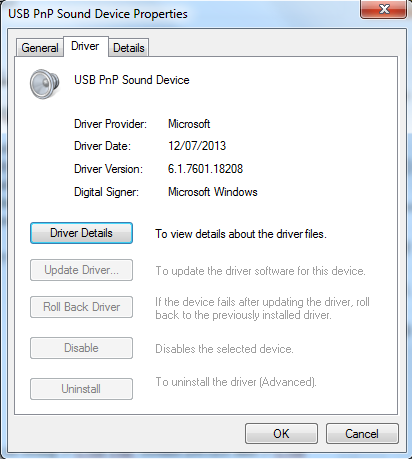
The sound card automatically picks up the necessary drivers from Microsoft's Windows Update site and the driver it uses is:
- USB PnP Sound Device
- Driver Provider: Microsoft
- Driver Date: 12/07/2013
- Driver Version: 6.1.7601.18208
- Digital Signer: Microsoft Windows
 |
| General Tab |
 |
| Driver Tab |
 |
| Driver Details |
The controller information field shows up my cards as being 3-USB PnP Sound Device and 5-USB PnP Sound Device (Generic USB Audio)
If you plug the device into a different USB socket it will pickup a different number.
Naming sound cards
 |
| Recording Device Naming |
 |
| Playback Device Naming |
It's always a good idea to name any devices you have in Windows from the defaults ones. It aids signal tracing later on.
I have named my devices as this:
3-USB PnP Sound Device - from now on known in the blog as Soundcard #3
- Recording - RX from FT-450D
- Playback - TX to FT-450D
5-USB PnP Sound Device - from now on know in the blog as Soundcard #5
- Recording - FT-450D Headphone Socket
- Playback - NOT IN USE - I don't use this currently for anything.
The 3.5mm (1/8") plugs on the custom lead coming from the Yaesu FT-450D Data socket are plugged into the relevant sockets on the 3-USB PnP Sound Device. I also have a lead coming from the headphone socket of the rig going to the recording socket of the 5-USB PnP Sound Device.
Sound Card Levels
As the input and output levels of the FT-450D data socket are fixed then you have to resort to using the digital attenuator supplied by the driver to the sound card. Fortunately the input and output of the rig are matched (impedance and line level) to the typical computer soundcard.On Soundcard #3 I have the following for the "Recording" settings:
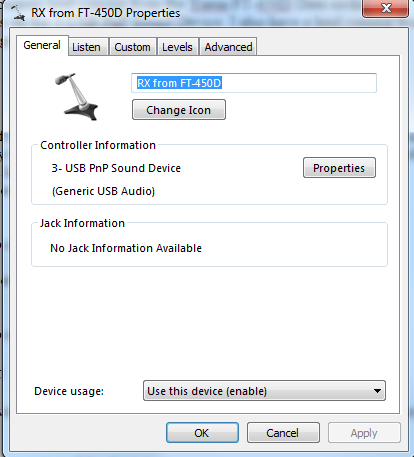 |
| General Tab This is where you change the name of the device and change its icon |
 |
| Listen Tab |
 |
NOTE AGC on the Custom Tab is disabled
|
 |
| Levels Tab |
 |
| Advanced Tab |
For the Soundcard #3 "Playback" settings I have this
 |
| General tab I have renamed it to something meaningful |
 |
| Levels tab 63% seems to work well for me ALC is controlled from within DM780 itself as seen in another of my blog posts |
 |
| Enhancements tab Nothing is selected here and left at default |
 |
| Advanced tab Again nothing is changed here |
On Soundcard #5 I have the following settings for the "Recording" settings :
 |
| General tab Note I have changed the Icon to a set of headphones |
 |
| Listen tab The "Listen to this device" checkbox is ticked see further down for details |
 |
| NOTE AGC on the Custom Tab is disabled |
 |
| Level Tab |
 |
| Advanced Tab |
I don't use the playback section of the Soundcard #5 so haven't included it.
Monitoring the rig output
I have the recording input of device 5 set to playback through the default playback device - in my case the EMU-0404To do this:
In the Sound manager open the properties of the device
- go to the Listen tab
- check the Listen to this device box
- make sure the Default Playback Device is selected
- Click OK twice.

You can then listen to the output of the the FT450D through the shack speakers and control the level using the AF Gain control on the rig (or control that with HRD Rig Control)
Monitoring sound card output
The Digital Level Meter software from darkwooddesigns.co.uk can be configured to monitor the input level of any of your sound cards.I set mine to monitor Soundcard#3 microphone socket - this is connected to the rig data output socket. I tuned to a typical busy position of the 20m band which has a lot of activity - 14.070 MHz USB the PSK portion.
As the level of the digital attenuator is set to 49% I get peaks of around -3.8dB and an average of -8dB which is just less that the software overload position.
 |
| A good peak level |
I turned the attenuator up to 100% (so it wasn't doing anything) and immediately went into the red peaking at 0db - and flashing OVERLOAD - which I would have expected. This was also verified in the DM780 module too as everything was saying OVERLOAD
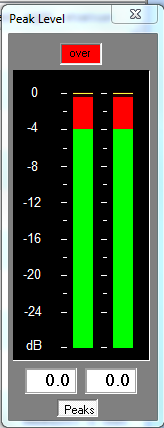 |
| Bad peak level |
As there was no way of turning down what is coming from the rig the only alternative is to activate the digital attenuator on the soundcard. This is not an ideal but the only thing I have.
I turned the attenuator back to 49% and all was well.
Using a digital oscilloscope to check the waveform for clipping.
The Soundcard Oscilloscope software can be used to check any permutation of soundcard within a PC. I had a look at the waveform of the signal on the Soundcard#3 microphone socket.

When set at 49% the signal was pure and smooth. When increased to 70% the peak level meter was just peaking into Overload also confirmed with DM780. The waveform on the Oscilloscope was also starting to clip.
I increased the level to 100% and the waveforms were continually clipping.
So I decreased the level back to 49% again and all returned to normality.
I think that level works well for me although I don't currently operate any of the JT65 or JT65-HF weak signal modes. These modes need your sound card set for optimum levels and the two pieces of software I highlighted can help in setting your station up to operate these modes.
Monitoring Sound Card Input,
It's always nice to see the signal that your PC is generating is at a good level and isn't introducing distortion into the start of the signal chain.
The Software Oscilloscope can be used to monitor the signal both coming from the computer and into the soundcard feeding the rig.
 |
| In my case I chose Loopback: TX to FT-450D (aren;t you glad you named the soundcards earlier on!) |
You can compare the waveform and make the necessary level adjustments.
 |
| A fairly smooth waveform being fed into the sound card |
Conclusion
It is easy to monitor the levels and waveforms of digimode audio both going in and coming out of your rig using a few simple freeware programs. You can then make sure you are making the most of your computer by obtaining the cleanest possible audio signal.
Thursday, 16 July 2015
Tuning out QRM on datamodes using the Yaesu FT-450D with DM-780 and Ham Radio Deluxe
This can sometimes result in swamping the signal coming from your contact.
 |
| The two useful filters on the FT-450D highlighted in yellow |
Friday, 12 June 2015
HRD 6.2.10.377 problems solved
Well it turns out that Microsoft's Windows Firewall was the culprit on this issue. It seems that during the installation process a command is issued asking your permission to punch a hole through for the HRD Logbook module. This didn't seem to be working when a machine was attached to a domain.
I setup a test box with vanilla Windows 7 domain member, no virus scanner (as that usually causes 99% of problems) and did an install with 6.2.9.355 and imported all my settings including the license. That worked OK in test. Then when I installed 6.2.10.377 over the top is started displaying issues during the install saying certain registry keys were not present. When I got HRD finally to start it would ask me for my license key again. Then when going into HRD logbook it said I had an invalid key and would not access the internet to pulldown lotw updates.
So I flattened my main machine and rebuilt it from ground up. After Windows 7 and all its respective drivers were installed the first program I installed was Avast licensed AV software. Then I did a straight install of 6.2.10.377. Again there were issues with various registry keys not being there but I clicked past them. Then I was presented with the licensing manager screen. I entered my callsign and key and then HRD complained again about certain registry keys not being present.
I decided to just open HRD logbook module on it's own as that was always the one that complained that there wasn't a license. Bingo I saw a Windows firewall prompting to allow access to the internet for HRD Logbook. Then it became hidden behind other windows but nothing seen on the task bar! I clicked around until it became active and was then able to allow the firewall. The rules were then written into the firewall.
I setup a test box with vanilla Windows 7 domain member, no virus scanner (as that usually causes 99% of problems) and did an install with 6.2.9.355 and imported all my settings including the license. That worked OK in test. Then when I installed 6.2.10.377 over the top is started displaying issues during the install saying certain registry keys were not present. When I got HRD finally to start it would ask me for my license key again. Then when going into HRD logbook it said I had an invalid key and would not access the internet to pulldown lotw updates.
So I flattened my main machine and rebuilt it from ground up. After Windows 7 and all its respective drivers were installed the first program I installed was Avast licensed AV software. Then I did a straight install of 6.2.10.377. Again there were issues with various registry keys not being there but I clicked past them. Then I was presented with the licensing manager screen. I entered my callsign and key and then HRD complained again about certain registry keys not being present.
I decided to just open HRD logbook module on it's own as that was always the one that complained that there wasn't a license. Bingo I saw a Windows firewall prompting to allow access to the internet for HRD Logbook. Then it became hidden behind other windows but nothing seen on the task bar! I clicked around until it became active and was then able to allow the firewall. The rules were then written into the firewall.
 |
| Here's what was trying to be written into the firewall rules |
Wednesday, 10 June 2015
Ham Radio Deluxe 6.2.10.377 - upgrade - my experiences
When a new upgrade for any software comes out I am always slow to install it. I remember the disastrous Windows NT Service Pack 6 in the late 1990's!!
On June 1st 2015 HRD Version 6.2.10.377 was released. This release makes many changes too numerous to mention
I installed it on June 6th. Oh dear!!. To say I am not impressed is an understatement.
The installation routine came up with several errors about registry keys/files not present.

On June 1st 2015 HRD Version 6.2.10.377 was released. This release makes many changes too numerous to mention
I installed it on June 6th. Oh dear!!. To say I am not impressed is an understatement.
The installation routine came up with several errors about registry keys/files not present.

Tuesday, 19 May 2015
PSK-63 working higher up the audio frequency waterfall
I noticed that when working on the 15m PSK frequency (21.070 MHz) trying to make a contact with a contest station on PSK-63 my station could not be heard. The waterfall showed this station at around 2300 Hz.
After checking out my ALC levels it was noticed that the ALC meter reading was considerably down at the low end despite the audio drive level being high. I went into the Transmit section of DM780 (the Ham Radio Deluxe module dedicated to audio/digital modes) and turned up the volume.
My station still could not contact the caller.
So I changed the radio frequency to 21.07150 MHz and tuned up again. This time the caller was at around 1KHz on the waterfall so was right in the sweet spot of my rigs audio range. The Transmit drive was reduced back to 30% and I sent out a reply to his CQ.
 BANG - got him straight away with the ALC two points less than the FT-450 colon symbol.
The moral? - Try to work stations at around 750 to 1500 Hz on the waterfall, re-tuning the rig if necessary, and you will put out a better PSK signal especially on higher bandwidth digimodes.
After checking out my ALC levels it was noticed that the ALC meter reading was considerably down at the low end despite the audio drive level being high. I went into the Transmit section of DM780 (the Ham Radio Deluxe module dedicated to audio/digital modes) and turned up the volume.
My station still could not contact the caller.
So I changed the radio frequency to 21.07150 MHz and tuned up again. This time the caller was at around 1KHz on the waterfall so was right in the sweet spot of my rigs audio range. The Transmit drive was reduced back to 30% and I sent out a reply to his CQ.
 |
| Rig retuned lowering the apparent waterfall frequency to around 1000 Hz |

The moral? - Try to work stations at around 750 to 1500 Hz on the waterfall, re-tuning the rig if necessary, and you will put out a better PSK signal especially on higher bandwidth digimodes.
Friday, 15 May 2015
6m openings
Over the past couple of days there have been interesting openings on 6m in the 50.100 to 50.200 MHz SSB segment of the band. At the present time there are many European continental stations that are workable from my QTH in north west England. When using Google Earth in conjunction with the Ham Radio Deluxe logbook module I can see most of the stations I can hear are on the same geographical heading of around 310 degrees.
These stations varied in signal strength from 53 to 59 and sounded like they were in the same room. I did hear a couple of local stations in Manchester which were a few miles away but in the noise. I think they may have been using vertically polarized antennae whereas mine is horizontal. Therefore on direct path I would appear many decibels down to them. However the continental stations would be being worked on the skywave and polarization didn't appear to be much of an issue to them.
The 6m band is quite fascinating. Sometimes there appears to be nothing and then it can be loaded with many stations.
Soon after writing this the band went quiet again. All in the space of an hour!
My advice is keep your eye on the DX cluster in whatever area of the world you live in for advanced warnings.
 |
| 4 x 6m stations worked in around 10 minutes all lying on the same direction |
These stations varied in signal strength from 53 to 59 and sounded like they were in the same room. I did hear a couple of local stations in Manchester which were a few miles away but in the noise. I think they may have been using vertically polarized antennae whereas mine is horizontal. Therefore on direct path I would appear many decibels down to them. However the continental stations would be being worked on the skywave and polarization didn't appear to be much of an issue to them.
The 6m band is quite fascinating. Sometimes there appears to be nothing and then it can be loaded with many stations.
Soon after writing this the band went quiet again. All in the space of an hour!
My advice is keep your eye on the DX cluster in whatever area of the world you live in for advanced warnings.
Subscribe to:
Posts (Atom)