Thursday, 25 May 2017

QSO Relay 1.3 - An update

Chris Fredericks VK2BYI responded to a support email about an issue I was seeing with QSO Relay.
I was seeing a popup message saying that QSO Relay could not verify if a QSO had been written into the HRD Database.
I switched on "Enable Tracing" as per the troubleshooting guide.
This Created a Session log and also should the Exception logs. After turning off the enable tracing tick box it wrote all the issues to the session log.

I then sent Chris the contents of my c:\users\<my user name>\AppData\Roaming\VK3BYI\QSORelay folder to the email stated in the guide

He replied back the very next day with the solution to my problem.  When I looked at his advice I indeed hadn't created a connection string to the HRD Access DB. I had not configured QSO Relay correctly - DOH. I'm not sure how I missed that but a few clicks and I was done.

Next right clicking the QSO Relay icon in the task bar brought up the "Synchronise Databases.." option.
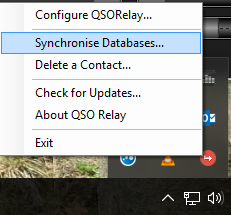
This synchronises the JTAlertX and HRD databases. I clicked it and got a message back saying that I had a duplicate record in my HRD database. It wrote the actual error into an exception log which is human readable. There it was in plain sight. I had a dupe in the log from back in 1980 that I hadn't noticed!
I deleted the dupe from HRD logbook and ran the synchronise process again. It ran without error.

Next, while still having the "Enable tracing" option checked I made a WSJT-X JT65 QSO.
QSO Relay intercepted the ADIF log and parsed it through to HRD without any error. I disabled the "Enable tracing" option and the session log was written to and closed. Examination of this log found that communication had worked and all was good.

I can't emphasise just how useful this small program is in your radio arsenal. When using WSJT-X and Ham Radio Deluxe Version 6.x in conjunction with the latest JTAlertX it is an essential addition.

Great thanks go to Chris VK2BYI for adding this superb program to the ham radio community and his fantastic support.

Tuesday, 23 May 2017

QSO Relay Version 1.3 review

I have been using JTAlertX 2.8.7 with Ham Radio Deluxe and decided to stick with that configuration due to the author of JTAlertX withdrawing support for HRD V6 (the paid for version).
This has been to the disappointment of many radio hams worldwide as the community thought that the two packages integrated well together. For whatever reasons the olive branch to make up was offered to the author from HRD LLC and was ignored.

Anyway new on the scene is a small program written by VK2BYI that enables usage of the later versions of JTAlertX to function again with Ham Radio Deluxe. Hurrah I hear you say.

I installed version 1.3 of the software this morning along with the latest version of JTAlert. QSO Relay comes with quick installation instructions and an in depth manual. It makes use of MicroSoft .Net Framework 4.6 which is pre-installed on Windows 10. Older versions of operating system may require you to install .Net Framework 4.6 if it hasn't been installed by other programs on your system.

JTAlertX needs to be changed to log to a standard ADIF file. The Quick Install pdf file shows you how to configure this.When firing up the QSO Relay software the first time after installation you need to configure it.
The pdf file shows you how to do it and then synchronize your HRD database with QSO Relays own SQLlite database.

Operation

In use the QSO Relay acts as a proxy between JTAlertX and Ham Radio Deluxe logbook.  It runs as a system tray application that listens for contacts being forwarded from WSJT-X/JTALertX via a UDP port. As datagrams are received they are logged locally in a SQLLite database and then relayed using TCP to the Ham Radio Deluxe Logbook (Version 6.x) database.
I found this worked well but there was a popup message saying that the QSO had not been entered into the log. When I looked at the HRD logbook it was there. I was unable to capture the popup box as it was partially obscured by another window. Another QSO brought the same popup box but again disappeared before I had time to look which program was generating it.

If you want to try out the software yourself I can recommend it and it is available from www.vk2byi.com.au/qsorelay

Monday, 8 May 2017

Ham Radio Deluxe LLC offers olive branch to JTAlert developer.

Dr Mike Carper, WA9PIE, the co owner of Ham Radio Deluxe LLC has offered an olive branch to Laurie VK3AMA the developer of JTAlert. Essentially Mike has offered to meet up with Laurie, maybe over a meal, to repair a relationship issue.
There are a lot of radio hams worldwide hoping for a good outcome for this. At the time of writing Laurie has not accepted Mike's dinner invitation. Mike is in Melbourne, Australia until May 12th 2017.
Good luck Mike I hope it all goes well.

Terry G8YPH

"I sent Laurie (VK3AMA) an email inviting him to dinner with me in  Melbourne.  He basically replied saying he wasn't interested in a dinner reservation.  For the record - I've never had any interactions with Laurie - positive or negative.  I've certainly not done anything to cause ill will.  Nonetheless, I'll keep trying.  I think HRD and JT Alert have users who need our mutual and cooperative support.  I hope he'll reconsider.  I'll be in Melbourne until Thursday.

Mike, WA9PIE"

Tuesday, 18 April 2017

HRD 6.4.0.646 minor issue

Ham Radio Deluxe 6.4.0.646 was released earlier today (18th April 2017) and immediately I found an issue with it. I noticed during installation a message saying "Microsoft Access 2007 is being uninstalled". There were no questions asked it just did it.
The end result was that no databases (logbooks) could be opened nor new ones created. The simple solution to this is to reinstall the Microsoft Access 2007 Runtime. You did keep that copy you had didn't you? If you can't find it don't worry as there is a link in the FAQs section of the Ham Radio Deluxe LLC website.
Here it is
https://tickets.hrdsoftwarellc.com/kb/faq.php?id=114

or go straight to Microsoft Website to download it yourself.
https://www.microsoft.com/en-gb/download/details.aspx?id=4438

After installation the logbooks return.

Wednesday, 15 March 2017

Migrating Ham Radio Deluxe to a new computer

This is easy to do and is outlined in the HRD manual. Just follow the instructions and all will work ok.

I had reason to re-format my computer. A Windows 10 upgrade to the Windows 10 Anniversary update edition didn't go too well. I think originally upgrading the computer from Windows 7 to Windows 10 with an inplace upgrade wasn't the correct way to go. I had all sorts of issues with soundcards not working 100% afterwards and crackling sounds. When I let it do the anniversary update things went from bad to worse. I let it run for a few months and persevered with its idiosyncrasies.

Then a couple of weeks back (late February 2017) I had had enough. I bought a new 1TB HDD to replace the 2TB HDD I had been using for the C: drive. I kept that so I could retrieve any files off it should it be necessary.

The boot into Windows 10 Anniversary edition was quick and uneventful. When I had it attached to my domain I uninstalled any of the crapware that gets installed by default and installed Avast AV.
The next thing I installed was Ham Radio Deluxe. I restored the backup I had made including the registry files (If you want to backup a working version of HRD in RIg Control go to Tools>Archive and follow the instructions).

I started up the rig and fired up HRD and everything was there, logbook, DM780 settings, Rig control with all the customizations I had made, the lot. I can't see why people make such a big deal out of it. If you follow the instructions in the manual it works first time. Admittedly I tried it on a virtual machine that I had built on another computer to test the process before I tried it for real.

I then reinstalled only the essential software I need on that PC which is:

  • Microsoft Office 2016
  • Google Chrome
  • WSJT-X
  • JTAlert
  • Sketchup 2017
  • Adobe Reader
  • VNC Reader 

and a few other minor pieces of software.

All data files are stored remotely on a server so I had no data to restore.

I made a list of what had been installed and on what date to ensure that if I install anything else and it breaks something I can narrow it down.

Tuesday, 28 February 2017

Snow, 40 metres and JT65 with XSJT-X v 1.7.0

It is snowing this dull last day of February morning in 2017.
I have been using WSJT-X for quite some time now and find that it is the only software I use these days due to the modes it brings to datamodes. I was a volunteer for the release candidate of 1.7.0 reporting back any issues (I didn't find any) and have been using the production version since day one.

It is used at G8YPH in conjunction with Ham Radio Deluxe as the rig controller and logger. Although JTAlert (at least with my setup) is now stuck at version 2.8.7 due to the ongoing spat between HRD LLC and the developer of JTAlert.

Anyway it is snowing and DX is flowing in on 40 metres this morning. I am making the most of it until conditions change. I can even see snow/ice sticking to the antenna so it must be cold out there!

Tuesday, 7 February 2017

JT9 DX on 40 metres mid morning

The HF bands are up and down, communication if you believe the propagation forecasts are not very good (early February 2017). A case in point was today with inter UK working being not very good. Close continental Europe of course is fine. I worked a station in Luxembourg, Netherlands and Switzerland.
Then on JT9 I saw Paul KA1MDQ over in Mashpee, MA, USA on the screen calling CQ. I went straight back to him and we exchanged RST signal reports of -22db and -25db respectively. As people know my antenna isn't complicated (just a long wire with 5 watts fed from a remote ATU into a 9:1 UNUN). This was a distance of 3152 miles - not bad for 40 metres during the day. I was encouraged that the bands are still open during the mid morning which is my normal time of working.
Propagation forecast 7th February 2017
K of 1 is good and it does say conditions on 80-40m is fair during the day.


I had a look around 40m over the previous weekend on JT9 and JT65 at about 1AM and found that it was crowded with stations from all over the world. It's a pity I like my bed more than I like radio so did not work anybody.