I just noticed this on hamapps.com
"New JTAlert 2.10.0 is available for download.
This version has full support for FT8 and the 15sec T/R period.
HRD v6 logging is again supported. HRD v5 and V6 users need to upgrade their JTAlert version to 2.10.0 to avoid logging and spotting the wrong mode (FT8 spotted/logged as T10 or JT9).
Visit HamApps.com for the download link and upgrade instructions.
Please review these release notes for 2.10.0
**** HRD V6 logging is again supported by JTAlert.
**** The HRD V6 logging support in this release is a one-time event.
**** Releases after 2.10.0 will again no longer have HRD V6 support.
New Features:
- Full FT8 mode support and its 15 sec T/R period.
- All the Wanted alert types support FT8 mode tracking.
- Scan Log supports FT8 mode for all Alert types.
- Additional Alert tracking option, "Any WSJT-X Mode (JT65 or JT9 or FT8)".
- FT8 mode statistics from HamSpots included in Band Activity displays.
- Call History popup & standalone window support FT8 data from Log lookup.
- WSJT-X mode character included in JTAlert titlebar (before the Band).
Character matches that used in WSJT-X, "#" = JT65, "@" = JT9, "~" = FT8.
Changes:
- Macros window single instance setting removed. Each JTAlert instance must
open its own Macro window for each WSJT-X/JTDX instance.
- End TX/RX Period alert disabled for FT8 mode.
- Auto-Halt after current TX is disabled for FT8 mode.
- Confirmed Bands Display (below log fields) right area will display Bands
worked/confirmed matching WSJT-X TX mode JT9 or FT8
- Many internal code changes to support FT8 mode and 15s T/R period and to
correctly distinguish between WSJT-X and JTDX running processes.
(** The JTDX program calls itself wsjtx.exe which it isn't **)
- The multi-instance support has also been changed. Running multiple copies
of JTAlert against both WSJT-X and JTDX simultaneously is not supported.
You can run multiple instances of JTAlert against either WSJT-X OR JTDX
only. Both types of applications can be running simultaneously on the PC,
but only one JTAlert operating mode (against WSJT-X or JTDX) is allowed.
Fixes:
- WSJT-X docking stops when a WSJT-X Configuration switch is made.
- DXKeeper Capture window inadvertently populated when DXKeeper is instructed
to filter its display on a new DX Call change.
de Laurie VK3AMA"
One time event? I'm not sure what is going on there and I actually don't care. I now use the excellent QSO Relay as a go between to allow JTAlert and HRD logging to function
Friday, 21 July 2017

Friday, 7 July 2017
HRD 6.4.0.659 Issue
I thought this was a temporary fault with HRD 6.4.0.646 as reported in a previous post. The latest version 659 still has the same problem.
This is when upgrading from an older version to the current version then the installation routine uninstalls the Microsoft Access Runtime.
Not a major issue as long as you manually reinstall the runtime before you fire up the logbook module.
This is when upgrading from an older version to the current version then the installation routine uninstalls the Microsoft Access Runtime.
Not a major issue as long as you manually reinstall the runtime before you fire up the logbook module.
Thursday, 8 June 2017
Making QSO Relay auto start in Windows 10
QSO Relay, if you haven't already tried it out, is a superb piece of software written by VK2BYI. Essentially it bridges the gap between JTAlertX and Ham Radio Deluxe since the author of JTAlert discontinued support for HRD 6.x (the paid for version of HRD).
QSO Relay sits in between the two pieces of software and relays QSOs to HRD.
I found that occasionally it wasn't logging until I found out why. It wasn't running in the task bar after a reboot. On Windows 7 you can just drag the shortcut for any software you want to run on Windows startup into the StartUp folder on the start menu.
Not so on Windows 10 and you have to do a little fiddling to get it to do the same.
Press the Windows key and R simultaneously to bring up the Run dialog.

In the box that appears type shell:startup and press OK

Windows explorer opens in your own AppData location
Next drag the shortcut of the program you wish to auto start into the explorer box, in this case the shortcut of QSORelay.
Close explorer and that is it. Next time you reboot Windows and login QSORelay will be automatically running.
QSO Relay sits in between the two pieces of software and relays QSOs to HRD.
 |
| QSO Relay normally runs in the task bar near the clock. After a reboot it was found not to be automatically running. |
Not so on Windows 10 and you have to do a little fiddling to get it to do the same.
Press the Windows key and R simultaneously to bring up the Run dialog.

In the box that appears type shell:startup and press OK

Windows explorer opens in your own AppData location
Next drag the shortcut of the program you wish to auto start into the explorer box, in this case the shortcut of QSORelay.
Close explorer and that is it. Next time you reboot Windows and login QSORelay will be automatically running.
Thursday, 25 May 2017
QSO Relay 1.3 - An update
Chris Fredericks VK2BYI responded to a support email about an issue I was seeing with QSO Relay.
I was seeing a popup message saying that QSO Relay could not verify if a QSO had been written into the HRD Database.
I switched on "Enable Tracing" as per the troubleshooting guide.
 This Created a Session log and also should the Exception logs. After turning off the enable tracing tick box it wrote all the issues to the session log.
I then sent Chris the contents of my c:\users\<my user name>\AppData\Roaming\VK3BYI\QSORelay folder to the email stated in the guide
He replied back the very next day with the solution to my problem. When I looked at his advice I indeed hadn't created a connection string to the HRD Access DB. I had not configured QSO Relay correctly - DOH. I'm not sure how I missed that but a few clicks and I was done.
Next right clicking the QSO Relay icon in the task bar brought up the "Synchronise Databases.." option.
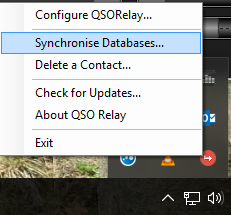
This synchronises the JTAlertX and HRD databases. I clicked it and got a message back saying that I had a duplicate record in my HRD database. It wrote the actual error into an exception log which is human readable. There it was in plain sight. I had a dupe in the log from back in 1980 that I hadn't noticed!
I deleted the dupe from HRD logbook and ran the synchronise process again. It ran without error.
Next, while still having the "Enable tracing" option checked I made a WSJT-X JT65 QSO.
QSO Relay intercepted the ADIF log and parsed it through to HRD without any error. I disabled the "Enable tracing" option and the session log was written to and closed. Examination of this log found that communication had worked and all was good.
I can't emphasise just how useful this small program is in your radio arsenal. When using WSJT-X and Ham Radio Deluxe Version 6.x in conjunction with the latest JTAlertX it is an essential addition.
Great thanks go to Chris VK2BYI for adding this superb program to the ham radio community and his fantastic support.
I was seeing a popup message saying that QSO Relay could not verify if a QSO had been written into the HRD Database.
I switched on "Enable Tracing" as per the troubleshooting guide.

I then sent Chris the contents of my c:\users\<my user name>\AppData\Roaming\VK3BYI\QSORelay folder to the email stated in the guide
He replied back the very next day with the solution to my problem. When I looked at his advice I indeed hadn't created a connection string to the HRD Access DB. I had not configured QSO Relay correctly - DOH. I'm not sure how I missed that but a few clicks and I was done.
Next right clicking the QSO Relay icon in the task bar brought up the "Synchronise Databases.." option.
This synchronises the JTAlertX and HRD databases. I clicked it and got a message back saying that I had a duplicate record in my HRD database. It wrote the actual error into an exception log which is human readable. There it was in plain sight. I had a dupe in the log from back in 1980 that I hadn't noticed!
I deleted the dupe from HRD logbook and ran the synchronise process again. It ran without error.
Next, while still having the "Enable tracing" option checked I made a WSJT-X JT65 QSO.
QSO Relay intercepted the ADIF log and parsed it through to HRD without any error. I disabled the "Enable tracing" option and the session log was written to and closed. Examination of this log found that communication had worked and all was good.
I can't emphasise just how useful this small program is in your radio arsenal. When using WSJT-X and Ham Radio Deluxe Version 6.x in conjunction with the latest JTAlertX it is an essential addition.
Great thanks go to Chris VK2BYI for adding this superb program to the ham radio community and his fantastic support.
Tuesday, 23 May 2017
QSO Relay Version 1.3 review
I have been using JTAlertX 2.8.7 with Ham Radio Deluxe and decided to stick with that configuration due to the author of JTAlertX withdrawing support for HRD V6 (the paid for version).
This has been to the disappointment of many radio hams worldwide as the community thought that the two packages integrated well together. For whatever reasons the olive branch to make up was offered to the author from HRD LLC and was ignored.
Anyway new on the scene is a small program written by VK2BYI that enables usage of the later versions of JTAlertX to function again with Ham Radio Deluxe. Hurrah I hear you say.
I installed version 1.3 of the software this morning along with the latest version of JTAlert. QSO Relay comes with quick installation instructions and an in depth manual. It makes use of MicroSoft .Net Framework 4.6 which is pre-installed on Windows 10. Older versions of operating system may require you to install .Net Framework 4.6 if it hasn't been installed by other programs on your system.
JTAlertX needs to be changed to log to a standard ADIF file. The Quick Install pdf file shows you how to configure this.When firing up the QSO Relay software the first time after installation you need to configure it.
The pdf file shows you how to do it and then synchronize your HRD database with QSO Relays own SQLlite database.
I found this worked well but there was a popup message saying that the QSO had not been entered into the log. When I looked at the HRD logbook it was there. I was unable to capture the popup box as it was partially obscured by another window. Another QSO brought the same popup box but again disappeared before I had time to look which program was generating it.
If you want to try out the software yourself I can recommend it and it is available from www.vk2byi.com.au/qsorelay
This has been to the disappointment of many radio hams worldwide as the community thought that the two packages integrated well together. For whatever reasons the olive branch to make up was offered to the author from HRD LLC and was ignored.
Anyway new on the scene is a small program written by VK2BYI that enables usage of the later versions of JTAlertX to function again with Ham Radio Deluxe. Hurrah I hear you say.
I installed version 1.3 of the software this morning along with the latest version of JTAlert. QSO Relay comes with quick installation instructions and an in depth manual. It makes use of MicroSoft .Net Framework 4.6 which is pre-installed on Windows 10. Older versions of operating system may require you to install .Net Framework 4.6 if it hasn't been installed by other programs on your system.
JTAlertX needs to be changed to log to a standard ADIF file. The Quick Install pdf file shows you how to configure this.When firing up the QSO Relay software the first time after installation you need to configure it.
The pdf file shows you how to do it and then synchronize your HRD database with QSO Relays own SQLlite database.
Operation
In use the QSO Relay acts as a proxy between JTAlertX and Ham Radio Deluxe logbook. It runs as a system tray application that listens for contacts being forwarded from WSJT-X/JTALertX via a UDP port. As datagrams are received they are logged locally in a SQLLite database and then relayed using TCP to the Ham Radio Deluxe Logbook (Version 6.x) database.I found this worked well but there was a popup message saying that the QSO had not been entered into the log. When I looked at the HRD logbook it was there. I was unable to capture the popup box as it was partially obscured by another window. Another QSO brought the same popup box but again disappeared before I had time to look which program was generating it.
If you want to try out the software yourself I can recommend it and it is available from www.vk2byi.com.au/qsorelay
Monday, 8 May 2017
Ham Radio Deluxe LLC offers olive branch to JTAlert developer.
Dr Mike Carper, WA9PIE, the co owner of Ham Radio Deluxe LLC has offered an olive branch to Laurie VK3AMA the developer of JTAlert. Essentially Mike has offered to meet up with Laurie, maybe over a meal, to repair a relationship issue.
There are a lot of radio hams worldwide hoping for a good outcome for this. At the time of writing Laurie has not accepted Mike's dinner invitation. Mike is in Melbourne, Australia until May 12th 2017.
Good luck Mike I hope it all goes well.
Terry G8YPH
"I sent Laurie (VK3AMA) an email inviting him to dinner with me in Melbourne. He basically replied saying he wasn't interested in a dinner reservation. For the record - I've never had any interactions with Laurie - positive or negative. I've certainly not done anything to cause ill will. Nonetheless, I'll keep trying. I think HRD and JT Alert have users who need our mutual and cooperative support. I hope he'll reconsider. I'll be in Melbourne until Thursday.
Mike, WA9PIE"
There are a lot of radio hams worldwide hoping for a good outcome for this. At the time of writing Laurie has not accepted Mike's dinner invitation. Mike is in Melbourne, Australia until May 12th 2017.
Good luck Mike I hope it all goes well.
Terry G8YPH
"I sent Laurie (VK3AMA) an email inviting him to dinner with me in Melbourne. He basically replied saying he wasn't interested in a dinner reservation. For the record - I've never had any interactions with Laurie - positive or negative. I've certainly not done anything to cause ill will. Nonetheless, I'll keep trying. I think HRD and JT Alert have users who need our mutual and cooperative support. I hope he'll reconsider. I'll be in Melbourne until Thursday.
Mike, WA9PIE"
Tuesday, 18 April 2017
HRD 6.4.0.646 minor issue
Ham Radio Deluxe 6.4.0.646 was released earlier today (18th April 2017) and immediately I found an issue with it. I noticed during installation a message saying "Microsoft Access 2007 is being uninstalled". There were no questions asked it just did it.
The end result was that no databases (logbooks) could be opened nor new ones created. The simple solution to this is to reinstall the Microsoft Access 2007 Runtime. You did keep that copy you had didn't you? If you can't find it don't worry as there is a link in the FAQs section of the Ham Radio Deluxe LLC website.
Here it is
https://tickets.hrdsoftwarellc.com/kb/faq.php?id=114
or go straight to Microsoft Website to download it yourself.
https://www.microsoft.com/en-gb/download/details.aspx?id=4438
After installation the logbooks return.
The end result was that no databases (logbooks) could be opened nor new ones created. The simple solution to this is to reinstall the Microsoft Access 2007 Runtime. You did keep that copy you had didn't you? If you can't find it don't worry as there is a link in the FAQs section of the Ham Radio Deluxe LLC website.
Here it is
https://tickets.hrdsoftwarellc.com/kb/faq.php?id=114
or go straight to Microsoft Website to download it yourself.
https://www.microsoft.com/en-gb/download/details.aspx?id=4438
After installation the logbooks return.
Subscribe to:
Posts (Atom)